> ## Documentation Index
> Fetch the complete documentation index at: https://docs.augmentcode.com/llms.txt
> Use this file to discover all available pages before exploring further.
# Using Actions in Chat
> Actions let you take common actions on code blocks without leaving Chat. Explain, improve, or find everything you need to know about your codebase.
export const ArrowUpIcon = () => ;
export const Keyboard = ({shortcut}) =>
{shortcut}
;
 ## Using actions in Chat
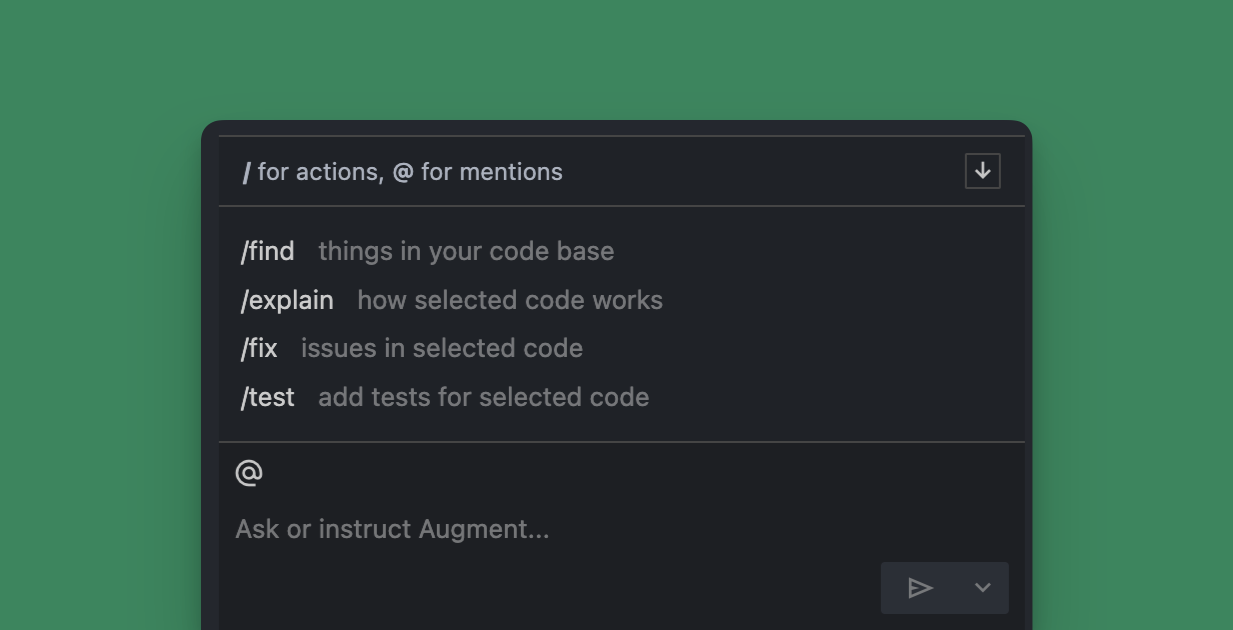
To use a quick action, you an use a command or click the up arrow iconto show the available actions. For explain, fix, and test actions, first highlight the code in the editor and then use the command.
| Action | Usage |
| :------------------------------- | :----------------------------------------------------------------------- |
| | Use natural language to find code or functionality |
| | Augment will explain the hightlighted code |
| | Augment will suggest improvements or find errors in the highlighted code |
| | Augment will suggest tests for the highlighted code |
Augment will typically include code blocks in the response to the action. See [Applying code blocks from Chat](/jetbrains/using-augment/chat-apply) for more details.
## Using actions in Chat
To use a quick action, you an use a command or click the up arrow iconto show the available actions. For explain, fix, and test actions, first highlight the code in the editor and then use the command.
| Action | Usage |
| :------------------------------- | :----------------------------------------------------------------------- |
| | Use natural language to find code or functionality |
| | Augment will explain the hightlighted code |
| | Augment will suggest improvements or find errors in the highlighted code |
| | Augment will suggest tests for the highlighted code |
Augment will typically include code blocks in the response to the action. See [Applying code blocks from Chat](/jetbrains/using-augment/chat-apply) for more details.