

Using Augment Code Review natively inside of GitHub
Augment Code Review helps professional software teams complete code-reviews faster inside GitHub while also catching more critical bugs before they hit production. Backed by Augment’s industry-leading Context Engine, the agent understands your codebase at a deep level, providing reviews that are more meaningful and account for codebase-wide effects. Augment prioritizes high signal-to-noise ratio by focusing on high-impact issues like bugs, security concerns, correctness, and cross-system problems while avoiding low-value style nags.Augment Code Review relies on the Augment GitHub App which is compatible with GitHub Enterprise Cloud and github.com. For GitHub Enterprise Server, see the GitHub Enterprise Server Setup Guide.
About the installation process
Visit app.augmentcode.com/settings/code-review and log in. Settings are accessible to all members of the Enterprise plan, but only configurable for Administrators of the Enterprise plan. If you aren’t sure if you are an Administrator, please contact your solutions team.Install the Augment GitHub App
Before you can configure repositories, install the Augment GitHub App and grant it access to the repositories you want to enable for Code Review.- Visit app.augmentcode.com/settings/code-review and log in.
- Click on the Install GitHub App button to begin the installation process.
- Follow the prompts to grant Augment access to the repositories you want to enable for Code Review.
Configuring Triggers Per Repository
As the Administrator, you control when Augment Code Review triggers via Settings. Look for “Set Review Trigger” to the right of the repository name.- Automatic: Augment Code Review will automatically review and post a comment as soon as the PR is opened for review in GitHub. Use it when your teams want immediate feedback on all pull requests.
-
Manual Command: Augment Code Review is only triggered when someone comments on the PR with any of the following:
auggie review,augment review, oraugmentcode reviewon GitHub. Use it when you want full control over when a review happens. - Disabled: Augment Code Review will not run on the repository.
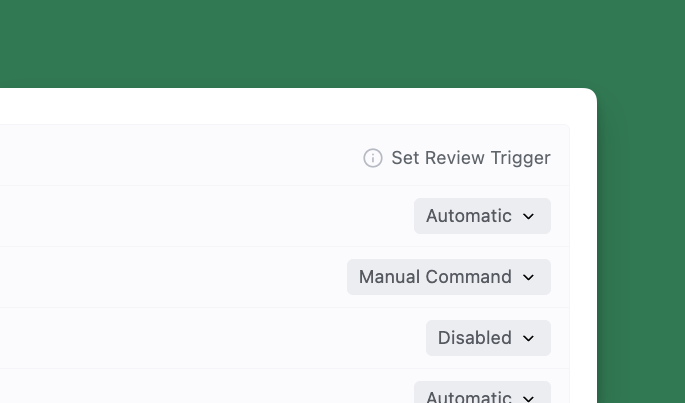
auggie review, augment review, or augmentcode review).
On public repositories, reviews are only triggered for PRs whose authors are members of the GitHub organization, outside collaborators to the organization or repository, or contributors to that repository.
Next Steps
Now that you’ve completed the basic setup, explore these additional features to get the most out of Augment Code Review:GitHub Enterprise Server
Set up Code Review for self-hosted GitHub instances
Adding Another Organization
Configure Code Review across multiple GitHub organizations
Review Guidelines
Set custom guidelines to focus reviews on specific areas
MCP Context
Connect external context sources via Model Context Protocol
User Access
Manage which users can trigger Code Review
Analytics Dashboard
Track metrics and measure Code Review impact
Providing Feedback
Learn how to provide feedback on reviews