

Using Augment Code Review
Augment Code Review is available as an add-on feature for individuals and teams. It provides automated code review directly in GitHub, helping you catch bugs and improve code quality before merging. Backed by Augment’s industry-leading Context Engine, the agent understands your codebase at a deep level, providing reviews that are more meaningful and account for codebase-wide effects. Augment prioritizes high signal-to-noise ratio by focusing on high-impact issues like bugs, security concerns, correctness, and cross-system problems while avoiding low-value style nags.About the installation process
Visit app.augmentcode.com/settings/code-review and log in. Settings are accessible to all Team members, but only configurable by Administrators of the plan.Install the Augment GitHub App
Install the Augment GitHub App and grant it access to the repositories you want to enable for Code Review.- Visit app.augmentcode.com/settings/code-review and log in.
- Click on the Install GitHub App button to begin the installation process.
- Follow the prompts to grant Augment access to the repositories you want to enable for Code Review.
Self-serve plans support a single GitHub organization. If you need to use Augment Code Review across multiple GitHub organizations, see Enterprise Features.
Configuring Triggers Per Repository
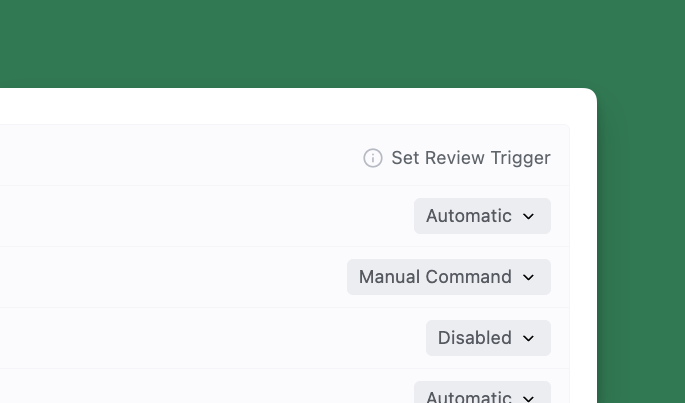
As the Administrator, you control when Augment Code Review triggers via Settings. Look for “Set Review Trigger” to the right of the repository name.- Automatic: Augment Code Review will automatically review and post a comment as soon as the PR is opened for review in GitHub. Use it when your teams want immediate feedback on all pull requests.
-
Manual Command: Augment Code Review is only triggered when someone comments on the PR with any of the following:
auggie review,augment review, oraugmentcode reviewon GitHub. Use it when you want full control over when a review happens. - Disabled: Augment Code Review will not run on the repository.
auggie review, augment review, or augmentcode review).
On public repositories, reviews are only triggered for PRs whose authors are members of the GitHub organization, outside collaborators to the organization or repository, or contributors to that repository.
If you are an Enterprise customer, please refer to the Enterprise setup guide for additional information.
Questions?
If you have questions about Augment Code Review or want to learn more about Enterprise features:- Visit our Support Center
- Join our Subreddit
- Contact Us Augment Support
Related Resources
- Code Review Overview - Learn about Code Review features
- Fix with Augment - Automatically fix issues in your IDE
- Setup Guide for Enterprise - Full setup instructions for Enterprise